Flutter Developer Career Guide: How to Break In and Move Up
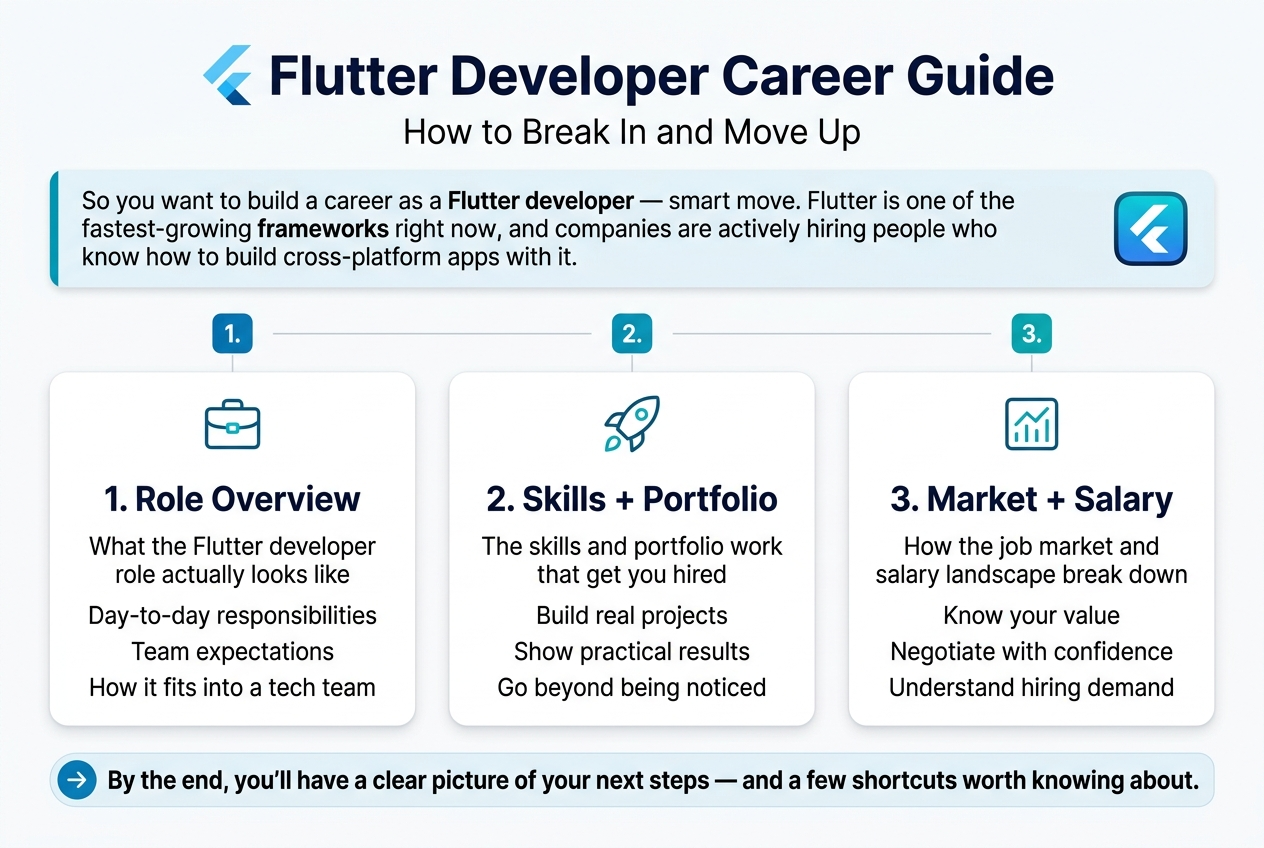
So you want to build a career as a Flutter developer — smart move. Flutter is one of the fastest-growing frameworks right now, and companies are actively hiring people who know how to build cross-platform apps with it.
This guide is for developers at any stage — beginners figuring out where to start, mid-level devs ready to level up, and career switchers coming from web or native mobile backgrounds.
Here’s what we’ll walk you through:
- What the Flutter developer role actually looks like — day-to-day responsibilities, expectations, and how it fits into a tech team
- The skills and portfolio work that get you hired, not just noticed
- How the job market and salary landscape break down, so you can negotiate with confidence
By the end, you’ll have a clear picture of your next steps — and a few shortcuts worth knowing about.
Understanding the Flutter Developer Role
Key Responsibilities and Daily Tasks of a Flutter Developer
A Flutter developer’s day is rarely monotonous. The work spans a wide range of tasks that blend creativity, logic, and collaboration — and no two projects look exactly the same.
Here’s what a typical Flutter developer handles on a regular basis:
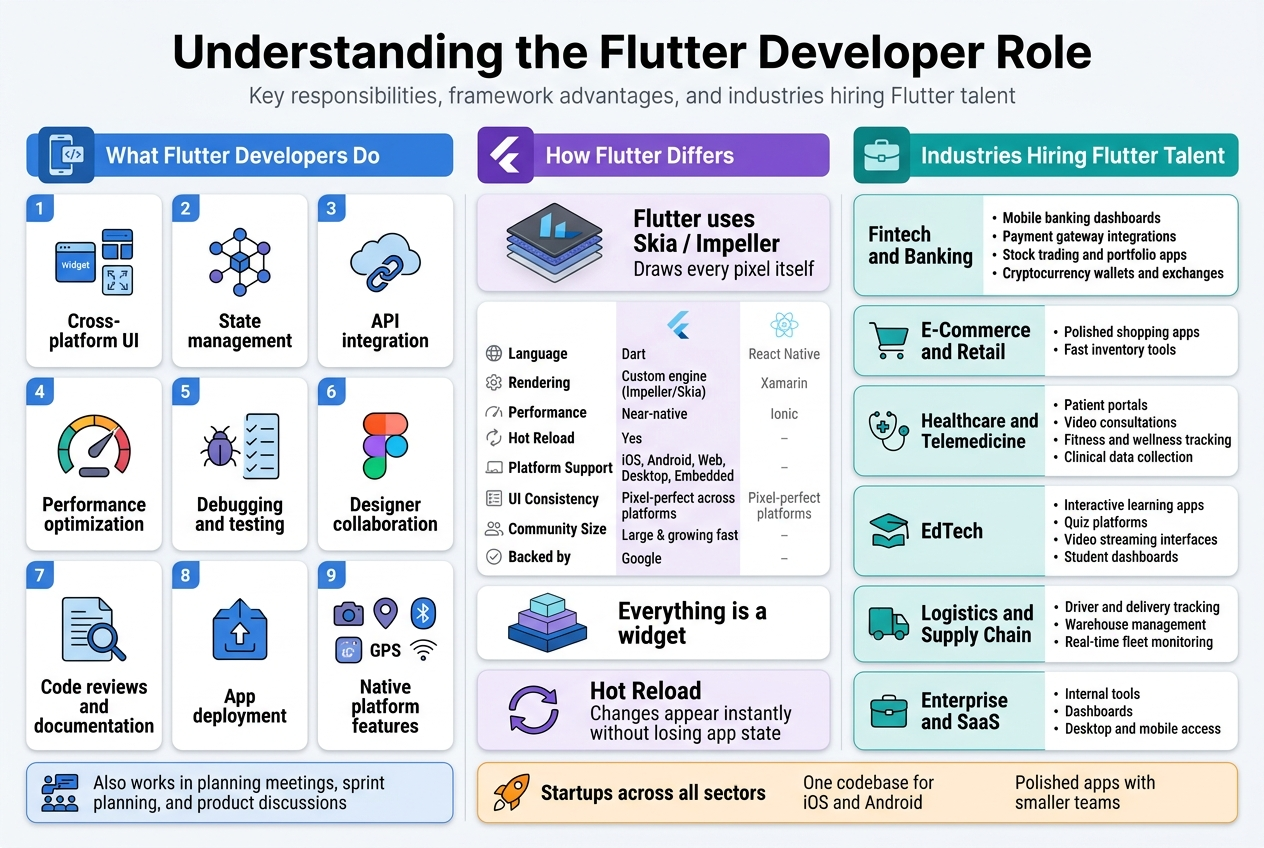
- Building cross-platform UI components — Writing widgets and layouts using Dart that render consistently across iOS, Android, web, and desktop platforms
- State management — Implementing solutions like Provider, Riverpod, BLoC, or GetX to manage how data flows through the app
- API integration — Connecting apps to RESTful APIs or GraphQL endpoints, handling authentication flows, and managing data serialization
- Performance optimization — Diagnosing jank, reducing widget rebuilds, optimizing image loading, and ensuring smooth 60fps or 120fps animations
- Debugging and testing — Writing unit tests, widget tests, and integration tests using Flutter’s testing framework and tools like Mockito
- Collaborating with designers — Translating Figma or Adobe XD designs into pixel-perfect Flutter code while maintaining responsiveness across different screen sizes
- Code reviews and documentation — Reviewing teammates’ pull requests, maintaining clean codebases, and documenting components for future reference
- App deployment — Managing releases through the Apple App Store, Google Play Store, and sometimes Firebase App Distribution for beta testing
- Working with native platform features — Writing platform channels to access device hardware like cameras, GPS, Bluetooth, or biometrics when Flutter plugins don’t cover the need
Beyond the technical side, Flutter developers often sit in planning meetings, contribute to sprint planning in Agile teams, and communicate directly with product managers and stakeholders about feature feasibility and timelines.
How Flutter Differs from Other Cross-Platform Frameworks
Flutter stands apart from its competitors in some pretty fundamental ways. Understanding these differences helps you appreciate why companies choose Flutter — and why the developer experience feels so different from working with React Native or Xamarin.
The Rendering Engine Difference
Most cross-platform frameworks rely on the host platform’s native UI components. React Native, for example, translates JavaScript components into native iOS and Android views. That sounds great in theory, but it means your app’s appearance is partly controlled by the operating system — and inconsistencies creep in across versions and devices.
Flutter takes a completely different approach. It uses its own rendering engine called Skia (and the newer Impeller engine) to draw every single pixel on the screen itself. Your app doesn’t borrow UI components from iOS or Android. Flutter paints everything from scratch using its own widget library.
This gives Flutter developers a massive advantage: what you see in your code is exactly what users see, regardless of the platform or OS version.
Dart vs. JavaScript
Flutter uses Dart, a language developed by Google. While React Native uses JavaScript — a language most web developers already know — Dart was built specifically with UI development in mind. It compiles to native ARM machine code, which gives Flutter apps genuinely fast performance that’s closer to native than other frameworks typically achieve.
Here’s a quick comparison of Flutter against other popular cross-platform frameworks:
| Feature | Flutter | React Native | Xamarin | Ionic |
|---|---|---|---|---|
| Language | Dart | JavaScript | C# | HTML/CSS/JS |
| Rendering | Custom engine (Impeller/Skia) | Native components | Native components | WebView |
| Performance | Near-native | Good | Good | Moderate |
| Hot Reload | Yes | Yes | Limited | Yes |
| Platform Support | iOS, Android, Web, Desktop, Embedded | iOS, Android, Web | iOS, Android, Windows | iOS, Android, Web |
| UI Consistency | Pixel-perfect across platforms | Varies by platform | Varies by platform | Consistent (web-based) |
| Community Size | Large & growing fast | Very large | Moderate | Moderate |
| Backed by | Meta | Microsoft | Ionic team |
Widget-Based Architecture
Everything in Flutter is a widget — buttons, padding, text, layouts, animations. This composable architecture makes building complex UIs feel like snapping Lego pieces together. It’s opinionated in a good way: there’s a clear, structured way to think about UI that becomes second nature once you get past the initial learning curve.
React Native developers moving to Flutter often say the biggest mental shift isn’t the language — it’s embracing the “everything is a widget” philosophy.
Hot Reload and Developer Experience
Flutter’s hot reload is genuinely one of the best in the industry. Changes appear in the app almost instantly without losing the current app state. This makes iterating on UI designs significantly faster and more enjoyable. Many developers who’ve worked across multiple frameworks cite Flutter’s development experience as one of the smoothest they’ve encountered.
Industries Actively Hiring Flutter Talent
Flutter has grown beyond startup MVP territory. Enterprises across dozens of industries are building production-grade apps with Flutter, which means the job market spans far wider than most people expect.
Fintech and Banking
Financial apps demand high performance, security, and consistent UI across platforms. Companies building mobile banking apps, payment platforms, investment tools, and crypto wallets have adopted Flutter heavily. The ability to maintain a single codebase while meeting the strict UI standards of financial products makes Flutter an obvious choice.
- Mobile banking dashboards
- Payment gateway integrations
- Stock trading and portfolio apps
- Cryptocurrency wallets and exchanges
E-Commerce and Retail
Online shopping apps need to look polished, load quickly, and work flawlessly on any device. Retailers building customer-facing apps or internal inventory management tools are turning to Flutter to cut development time and costs without sacrificing quality.
Healthcare and Telemedicine
The healthcare sector has seen a significant uptick in digital product development since 2020. Flutter developers are building:
- Patient portal apps
- Telemedicine and video consultation platforms
- Fitness and wellness tracking apps
- Clinical data collection tools for field teams
EdTech
Education technology companies love Flutter for its ability to create rich, interactive learning experiences on both iOS and Android simultaneously. Gamified lessons, quiz platforms, video streaming interfaces, and student dashboards are all common Flutter projects in this space.
Logistics and Supply Chain
Field operations need reliable, fast apps that work on a wide range of Android devices — including budget hardware. Flutter’s performance characteristics make it a strong fit for:
- Driver and delivery tracking apps
- Warehouse management systems
- Real-time fleet monitoring interfaces
Enterprise and SaaS
Large enterprises building internal tools, dashboards, and employee-facing applications are increasingly choosing Flutter. The ability to target desktop platforms (Windows, macOS, Linux) alongside mobile is a huge draw for companies that want their tools accessible from anywhere.
Startups Across All Sectors
Startups remain one of the biggest consumers of Flutter talent. When a small team needs to ship a polished app across iOS and Android without hiring separate native development teams, Flutter is often the first technology they reach for. This creates strong demand for Flutter developers who can own entire product experiences independently.
Essential Skills Every Flutter Developer Must Master
Dart Programming Language Fundamentals
Before you write a single line of Flutter code, you need to get comfortable with Dart. It is the backbone of everything Flutter does, and skipping this step is like trying to build a house without knowing what a hammer is.
Dart is a strongly typed, object-oriented language developed by Google. It feels familiar if you have worked with Java, Kotlin, or even JavaScript, but it has its own quirks and strengths worth understanding deeply.
Key Dart Concepts to Focus On
- Variables and data types – Dart uses
var,final, andconstdifferently, and knowing when to use each one saves you from a lot of bugs later. - Null safety – Introduced in Dart 2.12, null safety is now a core part of the language. You need to understand nullable vs. non-nullable types, the
?operator, and the!operator. - Async programming – Flutter apps constantly deal with data fetching, file reading, and delayed operations. Mastering
Future,async,await, andStreamis non-negotiable. - Object-Oriented Programming (OOP) – Classes, inheritance, mixins, abstract classes, and interfaces are all used heavily inside Flutter’s own framework.
- Collections and generics – Working with
List,Map, andSetefficiently will make your code cleaner and faster. - Functions as first-class objects – Dart treats functions like any other value. Arrow functions, anonymous functions, and closures pop up everywhere in Flutter code.
Dart Features That Make Flutter Shine
| Dart Feature | Why It Matters in Flutter |
|---|---|
| JIT Compilation | Powers Flutter’s hot reload during development |
| AOT Compilation | Makes Flutter apps fast and smooth in production |
| Null Safety | Reduces runtime crashes significantly |
| Strong Typing | Catches errors at compile time, not at 2 AM |
| Sound Type System | Enables better tooling and IDE support |
Spending two to three weeks focused purely on Dart before diving into Flutter widgets pays off massively. The developers who struggle with Flutter are often the ones who jumped straight into widgets without building a solid Dart foundation.
Flutter Widgets and UI Development Techniques
Flutter’s entire UI is built with widgets. Everything — padding, a button, a text label, even the app itself — is a widget. Once that clicks in your mind, the way you think about building screens changes completely.
Flutter has two main categories of widgets you will work with every day:
- StatelessWidget – Used when the UI does not need to change after it is built. Great for static content like profile cards or about pages.
- StatefulWidget – Used when the UI needs to react to user interactions or data changes, like a form, a counter, or a live feed.
Core Widgets Every Flutter Developer Uses Daily
Scaffold– The basic page structure with an app bar, body, and floating action button slots.Container– The Swiss Army knife of Flutter layout. Used for sizing, padding, margins, decoration, and more.RowandColumn– For horizontal and vertical layouts. You will use these constantly.Stack– For overlapping widgets, like placing text on top of an image.ListViewandGridView– For scrollable lists and grids of content.GestureDetector– For detecting taps, swipes, long presses, and other user gestures.FutureBuilderandStreamBuilder– For building UI that reacts to asynchronous data.
Layout Techniques Worth Mastering
Good layout skills separate average Flutter developers from great ones. Here is what you should get sharp on:
- Flex, Expanded, and Flexible – These control how much space widgets take up inside a Row or Column. Getting these wrong causes overflow errors and ugly UIs.
- MediaQuery and LayoutBuilder – For building responsive layouts that look good on phones, tablets, and desktops.
- CustomPaint and CustomClipper – For drawing custom shapes and designs that go beyond standard widgets.
- Slivers and CustomScrollView – For complex scrolling behaviors like collapsing app bars and sticky headers.
Animation and Theming
Flutter has a powerful animation system. Start with AnimatedContainer, AnimationController, and Tween animations. As you get more confident, explore Hero animations for smooth page transitions and Lottie for complex animated graphics.
Theming is another area where production-quality apps differ from hobby projects. Learn how to set up a proper ThemeData object with custom colors, typography, and component styles so your app looks consistent everywhere.
State Management Solutions That Boost App Performance
State management is one of the most talked-about topics in the Flutter community, and for good reason. How you handle state directly affects how your app performs, how easy it is to maintain, and how quickly bugs get introduced.
State, in simple terms, is the data that your app holds at any given moment — the items in a shopping cart, the current user’s login status, whether a button is loading or idle.
The Most Popular State Management Solutions
| Solution | Best For | Learning Curve | Community Adoption |
|---|---|---|---|
| setState | Small apps, simple local state | Very Low | Universal |
| Provider | Mid-size apps, clean architecture | Low to Medium | Very High |
| Riverpod | Scalable apps, testable code | Medium | Growing Fast |
| BLoC / Cubit | Large apps, strict separation of concerns | Medium to High | Very High |
| GetX | Rapid development, all-in-one solution | Low | High |
| MobX | Reactive programming style | Medium | Moderate |
Which One Should You Learn First?
Start with setState to understand the basics. Once that feels natural, move to Provider or Riverpod. Both are backed by the Flutter team and are widely used in real-world production apps.
If you are targeting larger companies or enterprise-level projects, learning BLoC is a smart move. It enforces a clean separation between business logic and UI, which makes large codebases much easier to manage and test.
Key State Management Concepts to Understand
- Lifting state up – Moving state to the closest common ancestor widget so multiple children can access it.
- Inherited widgets – The low-level mechanism Flutter uses to pass data down the widget tree. Most state management packages are built on top of this.
- Reactive programming – The idea that your UI automatically updates when the underlying data changes, without you needing to manually trigger rebuilds.
- Separation of concerns – Keeping your UI code away from your business logic. This is what makes apps maintainable as they grow.
Poor state management leads to apps that are slow, full of bugs, and a nightmare to debug. Getting this right from the start is one of the smartest investments you can make as a Flutter developer.
API Integration and Backend Connectivity Basics
Almost every real-world Flutter app talks to a backend. Whether it is fetching a list of products, authenticating a user, uploading a photo, or receiving real-time notifications — backend connectivity is a core skill you cannot skip.
Working with REST APIs
Most apps communicate with backends through REST APIs. Here is what you need to know:
- HTTP methods – GET, POST, PUT, PATCH, DELETE. Know when to use each one.
- The
httppackage – Flutter’s standard package for making HTTP requests. Simple and effective for most use cases. - The
diopackage – A more powerful option that supports interceptors, request cancellation, file uploads, and more. Preferred in production apps. - JSON serialization – Learn how to convert JSON responses into Dart objects using
jsonDecode, and better yet, using code generation withjson_serializablefor larger projects.
Authentication Handling
- Storing tokens securely using
flutter_secure_storage - Sending authorization headers with every request
- Handling token expiry and refresh flows
- Managing login state across app restarts
Firebase Integration
Firebase is one of the most common backend solutions for Flutter apps, especially for startups and smaller teams. Get comfortable with:
- Firebase Authentication – Email/password, Google Sign-In, and more
- Cloud Firestore – A real-time NoSQL database that syncs data across devices automatically
- Firebase Storage – For uploading and retrieving files like images and documents
- Firebase Cloud Messaging (FCM) – For push notifications
Error Handling and Loading States
One thing that separates polished apps from rough ones is how they handle errors. Build a habit of:
- Wrapping API calls in try-catch blocks
- Showing meaningful error messages to users instead of crashing
- Displaying loading indicators while data is being fetched
- Handling network timeouts gracefully
Real-Time Data with WebSockets and Streams
Some apps need real-time data — chat apps, live sports scores, stock prices. For these cases, you should understand:
- WebSockets – A persistent connection between the client and server for two-way communication
- Dart Streams – Perfect for listening to real-time data and updating the UI as new data arrives
- StreamBuilder widget – Builds UI in response to stream events without any extra setup
Getting solid at backend connectivity opens up the kinds of apps you can build dramatically. It is the difference between building simple demo projects and shipping real products that users actually rely on.
Building a Strong Flutter Portfolio That Gets Noticed
Choosing the Right Projects to Showcase Your Skills
Your portfolio is your handshake before the actual handshake. Recruiters and hiring managers spend less than a minute scanning a developer’s portfolio, so every project you include needs to pull its weight.
The biggest mistake Flutter developers make is filling their portfolio with tutorial clones — the same weather app, the same to-do list, the same BMI calculator that every other beginner has uploaded. These projects tell employers nothing interesting about you. Instead, think about what makes a project genuinely impressive:
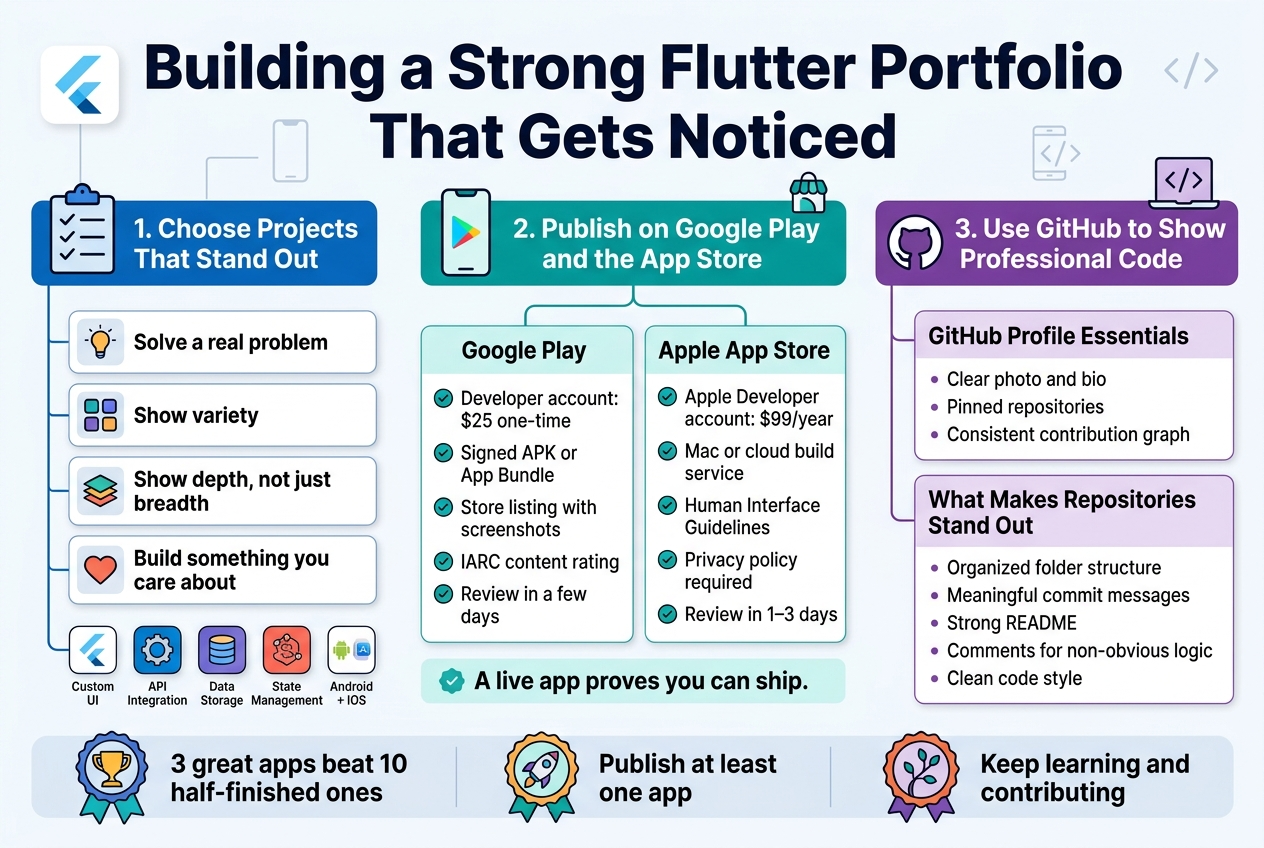
Pick projects that solve a real problem. Apps that address an actual pain point — even a small one — instantly communicate that you think like a product developer, not just a code monkey. A grocery list app for people managing dietary restrictions, a habit tracker with local notifications, or a personal finance tool with visual charts will always outperform a generic tutorial clone.
Aim for variety in what you demonstrate. A strong portfolio shows range. Try to include:
- At least one app with a polished, custom UI that goes beyond default Material widgets
- One project that integrates a real third-party API (weather, maps, payments, etc.)
- One app that handles local or remote data storage using something like Firebase, SQLite, or Hive
- One project that demonstrates state management — whether that’s Riverpod, BLoC, or Provider
- If possible, one cross-platform app that works well on both Android and iOS
Show depth, not just breadth. Three genuinely well-built apps will always beat ten half-finished ones. Employers want to see how you think through architecture, how you handle edge cases, and whether your code holds up when the project gets complex.
Build something you actually care about. Passion projects tend to be more complete, better documented, and more interesting to talk about in interviews. If you love fitness, build a workout tracker. If you’re into music, build a playlist manager. That enthusiasm comes through when you’re explaining the project to a recruiter.
Publishing Apps on Google Play and the App Store
Getting an app live on an actual store is a milestone that separates developers who can ship from those who only almost ship. Published apps carry real credibility — they show you understand the full development lifecycle, not just the coding part.
Why Publishing Matters
A live app on Google Play or the App Store proves you’ve dealt with:
- App signing and release builds
- Store listing requirements (screenshots, descriptions, content ratings)
- Version management and update cycles
- Real user feedback and crash reports
Employers notice this. Many developers build beautiful apps locally that never see the light of day. Publishing, even a free app with a handful of downloads, puts you ahead of a large chunk of the competition.
Getting Your App on Google Play
Google Play is generally the easier starting point. Here’s a quick breakdown of the process:
| Step | What’s Involved |
|---|---|
| Create a developer account | One-time $25 registration fee |
| Prepare a release build | Generate a signed APK or App Bundle |
| Create a store listing | Add screenshots, description, category, and icon |
| Set up content rating | Complete the IARC questionnaire |
| Submit for review | Google typically reviews within a few days |
Keep your initial release simple. A small, functional app that works reliably is better than a complex one with crashes.
Getting Your App on the Apple App Store
The App Store process is stricter and requires a Mac for final builds (or you can use services like Codemagic or Bitrise for cloud builds). You’ll need an Apple Developer account at $99/year.
Key things Apple reviewers pay attention to:
- App functionality — it must do what it claims
- UI compliance with Human Interface Guidelines
- Privacy policy if the app collects any data
- No placeholder content or incomplete features
Apple’s review can take 1–3 days on average, sometimes longer. Getting rejected on your first submission is common — don’t let it discourage you. Read the rejection reason carefully, fix the issue, and resubmit.
Making the Most of Your Published Apps
Once your app is live, link to it prominently in your portfolio and resume. Include the number of downloads if it’s impressive, screenshots showing the actual store listing, and any user reviews that highlight positive experiences.
Using GitHub to Demonstrate Clean, Professional Code
GitHub is where developers get quietly judged. A recruiter might not say it out loud, but they absolutely click through to your repositories. What they find there either builds confidence or raises doubts.
Setting Up a GitHub Profile That Works for You
Your GitHub profile is a living resume. Before you share it with anyone, make sure these basics are in place:
- A clear profile photo and bio — not a blank avatar. Write a one-liner that tells people what you do: “Flutter developer building cross-platform mobile apps.”
- Pinned repositories — GitHub lets you pin up to six repos. Use this to highlight your strongest Flutter projects, not random experiments.
- A green contribution graph — consistent activity signals that you’re actively coding. Even small commits — fixing a bug, updating documentation, refactoring a function — keep the graph alive.
Writing Code That Speaks for Itself
Clean code on GitHub does a lot of heavy lifting. When someone opens your repository, they’re looking for signs that you write maintainable, professional code — not just code that works.
Here’s what makes a Flutter repository stand out:
Folder structure matters. A well-organized project looks something like this:
lib/
  ├── core/
  │   ├── constants/
  │   ├── theme/
  │   └── utils/
  ├── data/
  │   ├── models/
  │   ├── repositories/
  │   └── services/
  ├── presentation/
  │   ├── screens/
  │   └── widgets/
  └── main.dart
A flat folder with 40 dart files dumped together sends the wrong signal.
Write meaningful commit messages. “fix stuff” and “update” tell nobody anything. Good commit messages look like:
feat: add user authentication with Firebasefix: resolve overflow issue on smaller screen sizesrefactor: extract reusable card widget from home screen
Add a solid README to every major project. A good README includes:
- What the app does (two to three sentences)
- Screenshots or a short screen recording GIF
- Tech stack and key packages used
- Setup instructions so someone else can run the project locally
- Any known limitations or planned features
Include comments where the logic is non-obvious. You don’t need to comment every line — that’s actually a red flag. But complex business logic, tricky async flows, or custom algorithms deserve a quick explanation.
What to Avoid on GitHub
Some things actively hurt your profile:
- Forked repos with zero contribution — forks you never actually worked on clutter your profile
- Abandoned projects with no README — they look like dead ends
- Copied code without attribution — this can come up in interviews and is easy to spot
- Inconsistent code style — use
dart formatand a linter likeflutter_lintsto keep your code consistent across all projects
Using GitHub to Show Your Growth
One underrated strategy is keeping a learning repository — a place where you document concepts, write small experiments, and work through Flutter topics systematically. Label it clearly as a learning repo. Employers appreciate seeing a developer who actively invests in their own growth, and this kind of repo shows exactly that.
You can also contribute to open-source Flutter packages on pub.dev or to Flutter-related projects on GitHub. Even small contributions — fixing a typo in documentation, reporting a well-documented bug, or submitting a minor pull request — show that you engage with the developer community beyond your own projects.
Earning Certifications and Expanding Your Knowledge
Google-Recognized Flutter and Dart Certifications Worth Pursuing
Certifications won’t replace hands-on experience, but they do something important — they signal to hiring managers that you’ve taken your learning seriously and you understand the ecosystem at a foundational level.
Here are the most relevant credentials to consider:
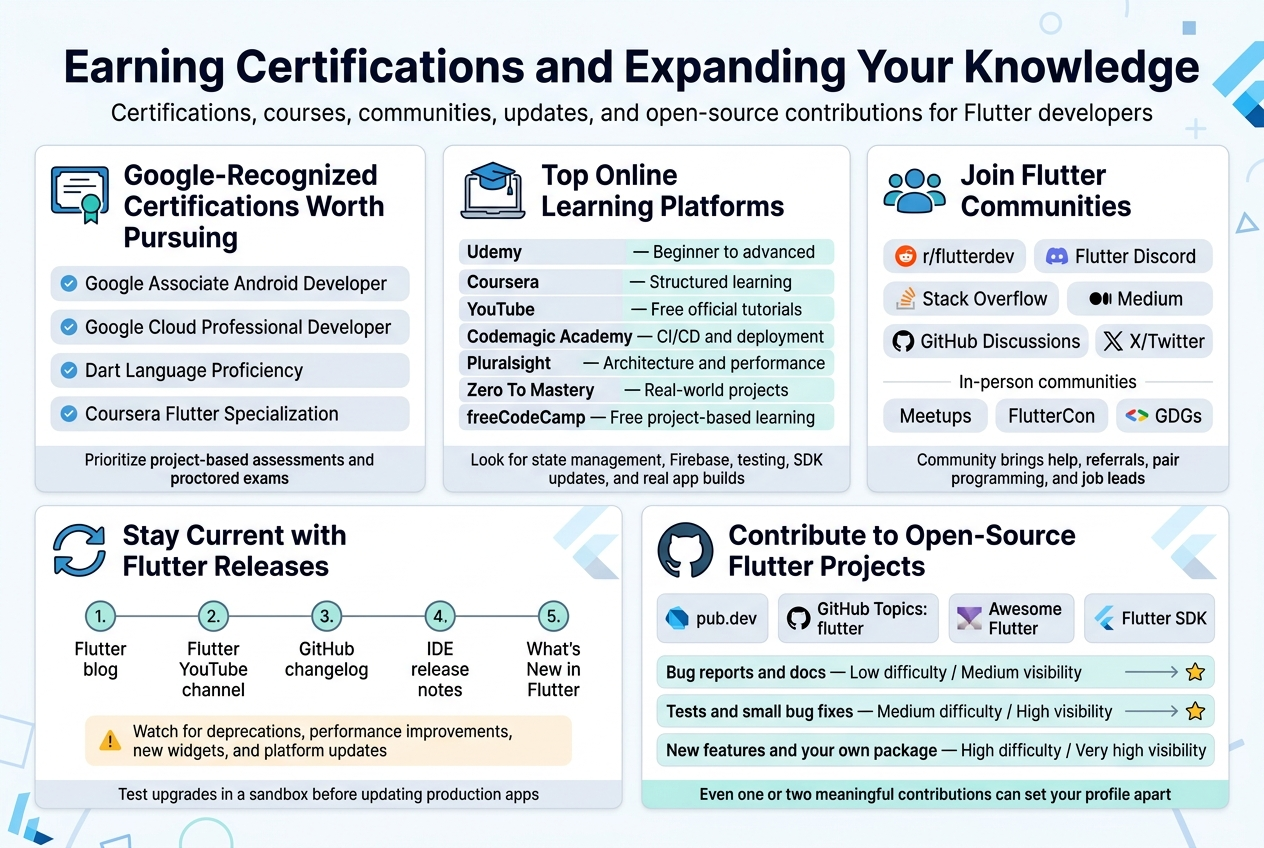
- Google Associate Android Developer (AAD): While not Flutter-exclusive, this certification is recognized by Google and demonstrates mobile development competency. Many Flutter developers pursue it as a stepping stone.
- Google Cloud Professional Developer: If you’re building Flutter apps that connect to Firebase or Google Cloud services, this certification shows you understand the backend side of the equation too.
- Dart Language Proficiency (via Google Developers Training): Google occasionally offers structured Dart learning paths through its developer programs. Completing these — even without a formal certificate — builds credibility and technical depth.
- Coursera Flutter Specialization (offered in partnership with Google): Google has partnered with Coursera to deliver structured Flutter training. Finishing a specialization gives you a shareable credential on LinkedIn that recruiters can actually verify.
One practical tip: prioritize certifications that come with project-based assessments. A certificate from a proctored exam or a portfolio-linked course carries significantly more weight than one you earned by clicking through slides.
Top Online Courses and Learning Platforms for Flutter Developers
The good news is that Flutter has one of the most generous learning ecosystems of any mobile framework right now. The tricky part is knowing which resources actually teach you what you need to know — versus which ones just keep you busy without moving you forward.
Here’s a breakdown of the best platforms and what they’re good for:
| Platform | Best For | Notable Courses |
|---|---|---|
| Udemy | Comprehensive beginner-to-advanced courses | “The Complete Flutter & Dart Development Course” by Angela Yu |
| Coursera | Structured, university-style learning with certificates | Google’s Flutter Development specializations |
| YouTube (official Flutter channel) | Free, up-to-date tutorials directly from the Flutter team | Flutter Widget of the Week, Flutter in Focus series |
| Codemagic Academy | CI/CD and deployment workflows for Flutter apps | Build automation and app store publishing |
| Pluralsight | Professional-level deep dives | Flutter architecture patterns, testing, and performance |
| Zero To Mastery (ZTM) | Balanced pacing with community support | Flutter Developer course with real-world projects |
| freeCodeCamp | Completely free, project-based | Flutter crash courses and guided builds |
What to look for in a good Flutter course:
- Covers state management solutions like Riverpod, Bloc, or Provider
- Includes Firebase integration and REST API calls
- Teaches you to write tests — unit, widget, and integration
- Updates its content with each new Flutter SDK release
- Builds real apps, not just toy demos
Angela Yu’s Udemy course consistently ranks at the top for beginners because it’s genuinely fun and keeps you building things from day one. If you’re already past the basics, Reso Coder’s YouTube channel and his Bloc/Clean Architecture tutorials are the go-to resources for leveling up your architecture game.
Joining Flutter Communities to Accelerate Your Growth
Learning Flutter in isolation is slow. Learning alongside a community is exponentially faster — and it opens doors that no course or certification ever will.
Online communities worth joining:
- Flutter Community on Reddit (r/flutterdev): Active discussions about real problems, job postings, project showcases, and the occasional heated debate about which state management solution is best
- Flutter Discord Server: Real-time help from experienced developers, dedicated channels for different topics like UI, Firebase, and architecture
- Stack Overflow (Flutter tag): The best place to get specific technical questions answered — and to build your own reputation by answering others
- Flutter Community on Medium: A curated publication where developers share tutorials, case studies, and deep dives
- GitHub Discussions (flutter/flutter): Where the actual Flutter team hangs out and discusses proposals, bugs, and roadmap items
- X/Twitter Flutter Dev Community: A surprisingly active space where core Flutter contributors, Google employees, and top developers share daily insights
Local and in-person communities:
- Search for Flutter meetups in your city on Meetup.com — many have come back post-pandemic and are incredibly valuable for networking
- Attend FlutterCon, the largest annual Flutter conference, either in person or through the live stream
- Check for Google Developer Groups (GDGs) near you — they regularly host Flutter-specific sessions and hackathons
The real magic of community isn’t just technical help. It’s the referrals, the job leads, the pair programming sessions that help you break through a wall you’ve been stuck on for three days. Show up consistently, ask good questions, and give back by answering questions at your current skill level.
Staying Current with Flutter Updates and New Releases
Flutter moves fast. Google ships multiple SDK updates throughout the year, and if you’re not keeping up, your code patterns and knowledge can get stale surprisingly quickly.
Here’s how to stay in the loop without it becoming a full-time job:
- Subscribe to the official Flutter blog at flutter.dev/blog — every major release and breaking change is documented here first
- Watch the Flutter YouTube channel — the team publishes release highlights, migration guides, and feature walkthroughs regularly
- Follow the Flutter changelog on GitHub — if you want the raw, unfiltered list of every change, this is where you go
- Enable release notes in your IDE — both VS Code and Android Studio will notify you when new Flutter and Dart SDK versions drop
- Read “What’s New in Flutter” posts — Google publishes these with every major release. They’re concise, practical, and tell you exactly what changed and why it matters
Key things to pay attention to with each release:
- Deprecations — any API that’s being phased out that you might be using in production
- Performance improvements — especially around rendering, startup time, and memory
- New widgets — sometimes a new widget solves a problem you’ve been working around with custom code
- Platform-specific updates — iOS, Android, web, desktop, and embedded targets each get their own improvements
One smart habit: spin up a test project in a new Flutter version before upgrading your production app. Breaking changes do happen, and it’s better to discover them in a sandbox than in a live codebase.
Contributing to Open-Source Flutter Projects for Visibility
Open-source contributions are one of the fastest and most underrated ways to build a reputation in the Flutter world. Hiring managers look at GitHub profiles. Other developers recognize contributors in community spaces. And the process of contributing makes you a dramatically better developer — because you’re reading and working with code written by people who are often much more experienced than you.
Where to find Flutter open-source projects to contribute to:
- pub.dev — Browse popular Flutter packages. Many are open source and actively maintained. Find ones where you use the package regularly, so you understand what improvements would actually help users.
- GitHub Topics: flutter — Filter by “help wanted” or “good first issue” labels to find beginner-friendly contribution opportunities
- Awesome Flutter (GitHub repo) — A curated list of Flutter resources that’s itself open source and accepts contributions
- The Flutter SDK itself — Yes, you can contribute directly to Flutter. Google has a contributor guide, and even documentation fixes count.
Types of contributions that get you noticed:
| Contribution Type | Difficulty | Visibility |
|---|---|---|
| Bug reports with reproduction steps | Low | Medium |
| Documentation improvements | Low | Medium |
| Writing or improving tests | Medium | High |
| Fixing small bugs (“good first issue”) | Medium | High |
| Adding new features to existing packages | High | Very High |
| Creating and publishing your own package | High | Very High |
How to make your contributions work for you career-wise:
- Write a short blog post or LinkedIn article explaining what you contributed and what you learned in the process
- List your open-source contributions prominently in your resume and portfolio
- Link to the merged pull requests — they’re verifiable proof of your skills
- Engage with maintainers professionally — these relationships often lead to referrals and collaborations
Even one or two meaningful contributions to a well-known Flutter package can set your profile apart from dozens of other candidates who have similar technical skills but no public work to show for it.
Navigating the Flutter Job Market Successfully
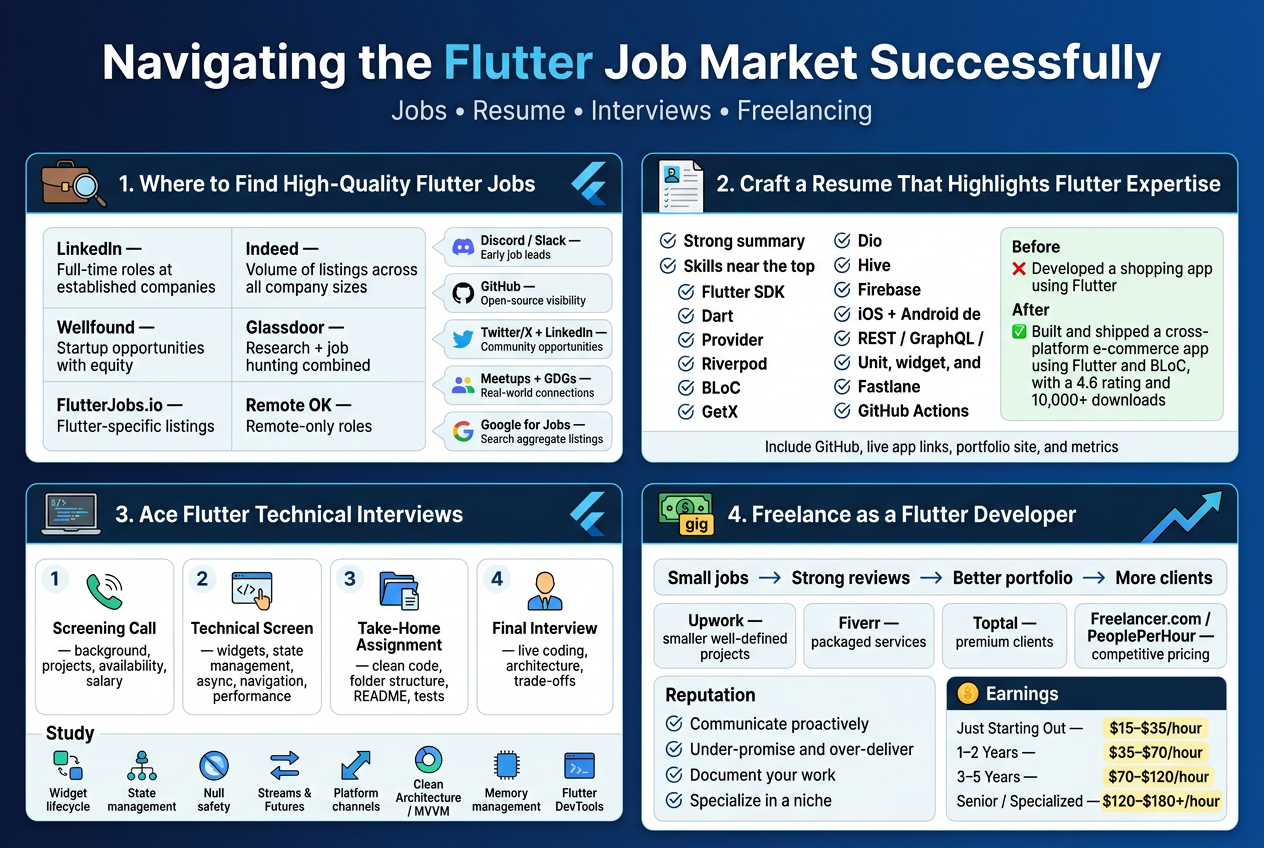
Where to Find High-Quality Flutter Developer Job Listings
The good news is that Flutter developer roles are genuinely in demand right now, and knowing where to look makes a huge difference in the quality of opportunities you come across.
Top Job Platforms Worth Bookmarking
| Platform | Best For | Notes |
|---|---|---|
| Full-time roles at established companies | Set up job alerts with keywords like “Flutter developer” or “Flutter engineer” | |
| Indeed | Volume of listings across all company sizes | Filter by remote, hybrid, or on-site |
| AngelList (Wellfound) | Startup opportunities with equity | Great for early-stage companies building mobile products |
| Glassdoor | Research + job hunting combined | Check salaries and company culture before applying |
| Stack Overflow Jobs | Developer-specific listings | Attracts technically strong employers |
| Toptal | Premium freelance and contract work | Requires passing a rigorous vetting process |
| Upwork & Fiverr | Freelance gigs and project-based work | Ideal when you’re building early experience |
| FlutterJobs.io | Flutter-specific listings | Niche but highly targeted |
| Remote OK | Remote-only roles | Strong for international opportunities |
Beyond job boards, some of the best Flutter roles never get publicly posted. That’s where community engagement really pays off. Being active on:
- Flutter’s official Discord and Slack channels — developers often share job openings before they hit job boards
- GitHub — contributing to open-source Flutter packages gets you noticed by companies scouting for talent
- Twitter/X and LinkedIn — following Flutter team members and Flutter GDE (Google Developer Experts) puts you close to conversations where opportunities surface
- Local Flutter meetups and Google Developer Groups (GDGs) — real human connections still open more doors than cold applications
Google for Jobs has also quietly become a strong aggregator. Search something like “Flutter developer remote” directly in Google, and it pulls relevant listings from across multiple platforms in one place.
Crafting a Resume That Highlights Your Flutter Expertise
A generic software developer resume will not get you far. Hiring managers reviewing Flutter roles are looking for specific signals that tell them you actually know how to build production-quality apps, not just tutorials.
Structure Your Resume Around What Flutter Employers Actually Care About
Start with a strong summary. Two to three sentences that immediately tell someone who you are and what you bring. Skip phrases like “passionate developer seeking opportunities.” Instead, try something like: “Flutter developer with 3+ years building cross-platform apps for fintech and e-commerce clients. Comfortable working across the full mobile development lifecycle, from architecture decisions to app store deployment.”
Put your skills section near the top. Flutter-specific employers often skim for keywords before reading deeply. Include:
- Flutter SDK version familiarity
- Dart language proficiency
- State management solutions you’ve used (Provider, Riverpod, BLoC, GetX)
- Package ecosystem experience (Dio, Hive, Firebase, etc.)
- Platform knowledge (iOS and Android deployment, app signing, build flavors)
- API integration patterns (REST, GraphQL, gRPC)
- Testing approaches (unit, widget, and integration tests)
- CI/CD tools you’ve worked with (Fastlane, GitHub Actions, Bitrise)
Showcase Projects With Real Metrics
Listing “built a Flutter app” on your resume tells the reader almost nothing. Employers want context and impact. Shape your experience bullets like this:
- ❌ “Developed a shopping app using Flutter”
- ✅ “Built and shipped a cross-platform e-commerce app for iOS and Android using Flutter and BLoC, achieving a 4.6 Play Store rating and 10,000+ downloads within three months of launch”
Whenever possible, include numbers — downloads, user retention rates, performance improvements, load time reductions, app store ratings, team size, or project timelines.
Link What You’ve Built
Always include:
- GitHub profile — and make sure your pinned repositories are your best Flutter work
- Play Store or App Store links if apps are live
- Portfolio website or personal site with project case studies
- Google Play Console or App Store Connect metrics if you can share them
Keep the overall resume to one or two pages max. If you’re early in your career, one page is cleaner. If you have five-plus years of experience with multiple shipped apps, two pages is fine.
Acing Technical Interviews With Flutter-Specific Preparation
Technical interviews for Flutter roles typically fall into a few predictable categories. Understanding what to expect lets you prepare with purpose instead of cramming everything and hoping for the best.
Common Interview Formats for Flutter Roles
1. Screening Call
Usually with a recruiter or HR. Expect questions about your background, project history, availability, and salary expectations. This is not the time for technical deep dives, but be ready to speak clearly about your most impactful Flutter projects.
2. Technical Phone/Video Screen
A developer or engineering lead will ask Flutter-specific conceptual questions. Common topics include:
- How Flutter’s widget tree and rendering pipeline work
- The difference between stateful and stateless widgets
- How you’d choose a state management approach for a specific use case
- Dart isolates and when you’d use them
- How to handle asynchronous operations in Flutter
- Navigation patterns (Navigator 1.0 vs 2.0, GoRouter, etc.)
- Performance optimization strategies
3. Take-Home Assignment
Many companies will send a small Flutter project to complete. This might involve:
- Building a small app from a design spec
- Integrating a public API and displaying the data
- Writing tests for a given widget or service layer
Treat take-home assignments like real production work. Clean code, proper folder structure, good naming conventions, and README documentation all matter. Add comments where your reasoning might not be obvious.
4. On-Site or Final Technical Interview
This can include live coding, system design questions specific to mobile architecture, or a walkthrough of your take-home project. You’ll often be asked to explain design decisions and trade-offs.
High-Yield Topics to Study Before Any Flutter Interview
- Widget lifecycle — understand when
initState,dispose,didUpdateWidget, andbuildare called and why it matters - State management — be able to compare BLoC, Riverpod, Provider, and GetX without stumbling
- Null safety — know how Dart’s sound null safety works and why it was introduced
- Streams and Futures — these come up constantly; understand the difference and know practical use cases
- Platform channels — even if you haven’t used them much, know what they are and when you’d reach for them
- App architecture patterns — Clean Architecture and MVVM are commonly referenced in Flutter codebases
- Memory management — how to identify and fix memory leaks in Flutter apps
- Performance profiling — understanding Flutter DevTools and how to diagnose jank or slow frame rendering
How to Handle Live Coding With Confidence
- Talk through your thinking out loud. Interviewers care as much about how you reason as they do about the final answer.
- If you don’t know something, say so honestly and explain how you’d find the answer. That’s a better signal than guessing wildly.
- Ask clarifying questions before writing a single line of code. It shows good engineering instincts.
- Prioritize working code over perfect code during the session. You can refactor later and explain what you’d improve.
Freelancing as a Flutter Developer to Gain Early Experience
Freelancing is one of the most underrated ways to build real-world Flutter experience, especially when you’re just getting started and don’t have full-time employment on your resume yet. It creates a positive cycle — projects build your portfolio, your portfolio wins you more projects, and more projects build credibility that eventually converts into full-time offers.
Where to Start as a Flutter Freelancer
Upwork remains one of the most accessible platforms for new Flutter freelancers. The competition is real, but so is the volume of work. When you’re just starting out, focus on smaller, well-defined projects rather than bidding on large-scale contracts. Completing a few smaller jobs with strong reviews builds your profile ranking fast.
Fiverr works well if you can package your skills into specific, repeatable service offerings. For example:
- “I’ll convert your Figma design into a Flutter UI”
- “I’ll fix bugs in your existing Flutter app”
- “I’ll integrate Firebase authentication into your Flutter project”
Specific and concrete offerings convert better than generic “I’ll build you an app” listings.
Toptal is for experienced Flutter developers who want premium clients and higher rates. Getting in requires passing a challenging technical screening, but the quality of clients is significantly higher.
Freelancer.com and PeoplePerHour are worth exploring, though the competition on price can be intense. Focus on quality of proposals over volume.
Building a Freelance Reputation That Compounds
A few habits separate successful Flutter freelancers from those who struggle to get consistent work:
- Communicate proactively. Clients who aren’t technical worry about being left in the dark. Regular updates build trust faster than anything else.
- Under-promise and over-deliver. Give realistic timelines and then beat them. That one habit alone generates repeat business and five-star reviews.
- Document your work. A short video walkthrough or written handoff document at the end of a project is a small effort that clients genuinely appreciate and remember.
- Specialize early. Flutter freelancers who position themselves as specialists in a specific niche — fintech apps, healthcare, e-commerce — command higher rates than generalists. Pick a vertical you’re genuinely interested in and build depth there.
Realistic Earning Expectations for Flutter Freelancers
| Experience Level | Typical Hourly Rate (USD) |
|---|---|
| Just Starting Out | $15 – $35/hour |
| 1–2 Years of Experience | $35 – $70/hour |
| 3–5 Years, Strong Portfolio | $70 – $120/hour |
| Senior / Specialized | $120 – $180+/hour |
Rates vary significantly by geography, client location, project complexity, and whether you’re positioning yourself as a generalist or a specialist. Developers targeting US or Western European clients typically earn at the higher end of these ranges.
Freelancing also gives you something just as valuable as money — exposure to diverse codebases, business problems, and technical challenges that a single full-time job at a company with one tech stack simply can’t replicate. That breadth of experience often accelerates career growth faster than any other path available early on.
Understanding Flutter Developer Salary and Career Growth
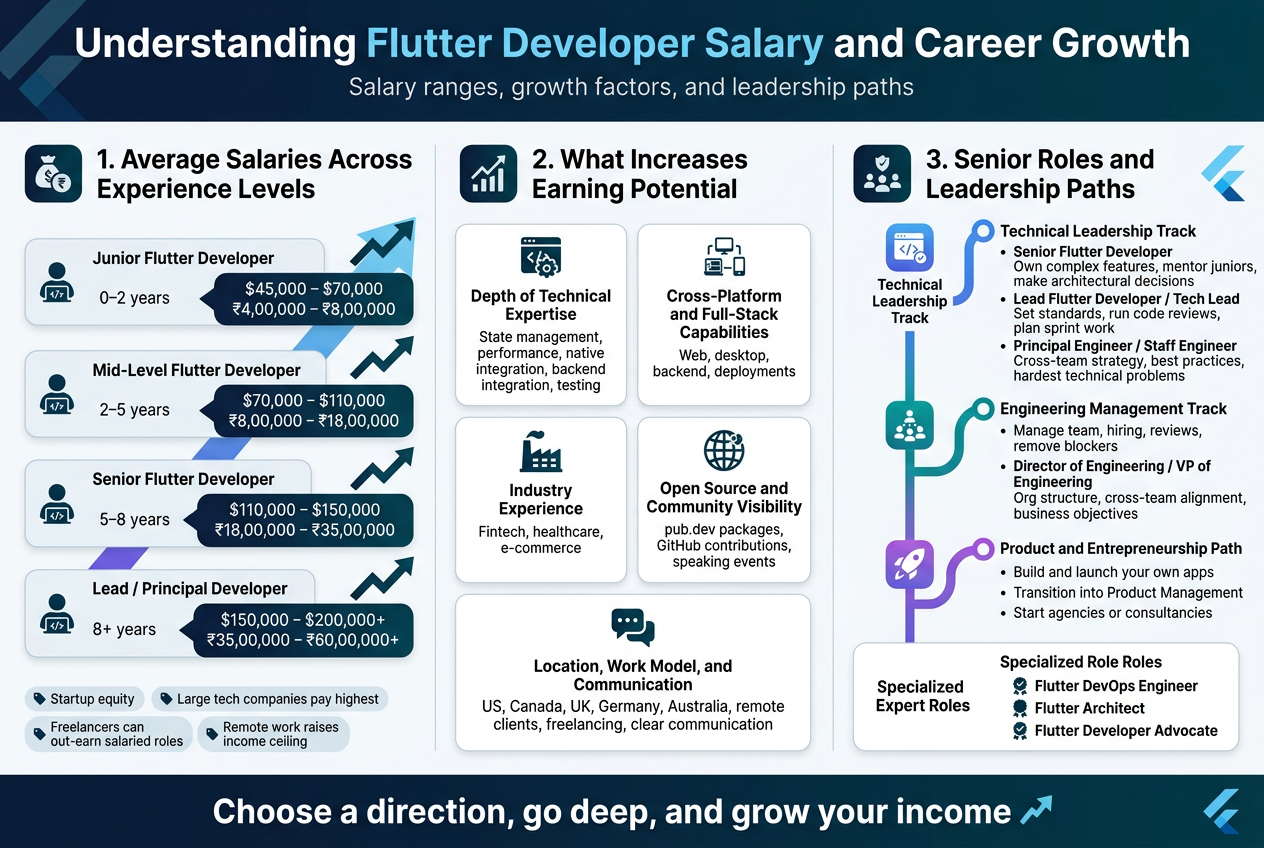
Average Salaries Across Different Experience Levels
Flutter developer salaries have grown significantly over the past few years as demand for cross-platform mobile development has exploded. Companies are willing to pay serious money for developers who can build high-quality apps for both iOS and Android from a single codebase.
Here’s a realistic breakdown of what you can expect to earn at different stages of your Flutter career:
| Experience Level | Years of Experience | Average Annual Salary (USD) | India (INR/Year) |
|---|---|---|---|
| Junior Flutter Developer | 0–2 years | $45,000 – $70,000 | ₹4,00,000 – ₹8,00,000 |
| Mid-Level Flutter Developer | 2–5 years | $70,000 – $110,000 | ₹8,00,000 – ₹18,00,000 |
| Senior Flutter Developer | 5–8 years | $110,000 – $150,000 | ₹18,00,000 – ₹35,00,000 |
| Lead / Principal Developer | 8+ years | $150,000 – $200,000+ | ₹35,00,000 – ₹60,00,000+ |
These numbers shift depending on the country, industry, and company size. Startups sometimes pay lower base salaries but compensate with equity. Large tech companies and product-based firms typically offer the highest packages. Freelance Flutter developers can often out-earn salaried employees, especially when working with international clients.
One thing worth paying attention to — remote work has completely changed the salary game. A developer sitting in Bangalore or Warsaw can now land contracts paying US or European rates. If you’re open to remote work, your income ceiling jumps dramatically.
Factors That Significantly Increase Your Earning Potential
Getting paid well as a Flutter developer isn’t just about how many years you’ve been coding. The developers who command the highest salaries tend to have a very specific combination of skills, experience, and positioning. Here’s what actually moves the needle:
Depth of Technical Expertise
Knowing Flutter basics gets you in the door. Mastering the deeper layers is what gets you paid more. Employers and clients will pay a premium for developers who understand:
- State management patterns — Proficiency with Riverpod, BLoC, or Provider at an architectural level
- Performance optimization — Knowing how to diagnose jank, manage widget rebuilds, and optimize rendering
- Native platform integration — Writing platform channels to bridge Flutter with native Android (Kotlin/Java) or iOS (Swift/Objective-C) code
- Backend integration — Working confidently with REST APIs, GraphQL, Firebase, and cloud services like AWS or GCP
- Testing — Writing unit, widget, and integration tests; many teams desperately need developers who can do this well
Cross-Platform and Full-Stack Capabilities
Flutter developers who can also build the backend, manage deployments, or work with web and desktop targets are worth far more than those limited to mobile alone. Flutter’s expansion into web and embedded platforms opens doors that mobile-only developers simply can’t access.
Industry Experience
If you’ve shipped apps in fintech, healthcare, or e-commerce, your value spikes. These industries have strict compliance requirements and high user expectations. Demonstrated experience in regulated or high-traffic environments signals that you can handle complexity and accountability.
Open Source Contributions and Community Visibility
Publishing packages on pub.dev, contributing to Flutter’s GitHub repository, or speaking at Flutter events builds a reputation that money simply can’t buy directly — but it does translate into better job offers, higher consulting rates, and direct inbound opportunities.
Location and Work Model
- Developers in the US, Canada, UK, Germany, and Australia earn the highest salaries for in-house roles
- Remote-friendly roles with international clients can dramatically boost earnings for developers in lower-cost-of-living regions
- Freelancing on platforms like Toptal, Upwork, or direct client referrals can yield $80–$150+ per hour for experienced developers
Soft Skills and Communication
This one gets underestimated constantly. Developers who can talk to clients, write clear documentation, give feedback in code reviews, and explain technical decisions to non-technical stakeholders consistently get promoted faster and earn more. Technical ability gets you hired; communication skills get you promoted.
Senior Roles and Leadership Paths Available to Flutter developers
Flutter development doesn’t have to be a forever individual-contributor role. There are several clear paths for growth, and the most successful developers tend to pick a direction and pursue it deliberately.
Technical Leadership Track
This path keeps you close to code while giving you broader influence over how a team or product is built.
- Senior Flutter Developer — You own complex features, mentor juniors, and make architectural decisions. You’re the person the team turns to when something is broken or confusing.
- Lead Flutter Developer / Tech Lead — You set technical standards, run code reviews, plan sprint work from a technical lens, and collaborate directly with product managers. You’re still coding, but you’re also responsible for the quality and direction of the team’s output.
- Principal Engineer / Staff Engineer — At this level, you’re thinking across multiple products or teams. You define best practices organization-wide, evaluate new technologies, and often work on the hardest technical problems that don’t fit neatly into a single sprint.
Engineering Management Track
Some experienced developers discover they’re energized by growing people rather than just growing code. If that resonates, the management track is a natural fit:
- Engineering Manager — You manage a team of Flutter developers, own hiring decisions, run performance reviews, and ensure projects ship on time. You spend less time coding and more time removing blockers and developing your team.
- Director of Engineering / VP of Engineering — At this level, you’re thinking about organizational structure, cross-team alignment, and business objectives. Technical background is still valued here, but strategy and people development become your primary currency.
Product and Entrepreneurship Path
A solid Flutter background pairs remarkably well with an entrepreneurial mindset. Many senior Flutter developers:
- Build and launch their own apps — With the ability to build fully functional apps for iOS, Android, and web, you can validate and launch product ideas without hiring a team
- Transition into Product Management — Developers who deeply understand what’s technically feasible and what users need often become outstanding product managers
- Start agencies or consultancies — Experienced Flutter developers frequently build service businesses, assembling small teams to deliver projects for clients globally
Specialized Expert Roles
Some developers choose depth over breadth, becoming recognized specialists in a specific niche:
- Flutter DevOps Engineer — Specializing in CI/CD pipelines, automated testing infrastructure, and deployment for Flutter apps
- Flutter Architect — Focusing on scalable app architecture, module design, and technical strategy for large-scale Flutter projects
- Flutter Developer Advocate — Working for companies like Google or major Flutter ecosystem players to educate, create content, and grow the developer community
Each of these paths offers genuine earning potential and job satisfaction. The key is choosing a direction based on what genuinely excites you, not just what pays the most in the short term — because the developers who go deep on something they care about almost always end up earning more anyway.
How Vrinda International Can Help You Land a Flutter Developer Job
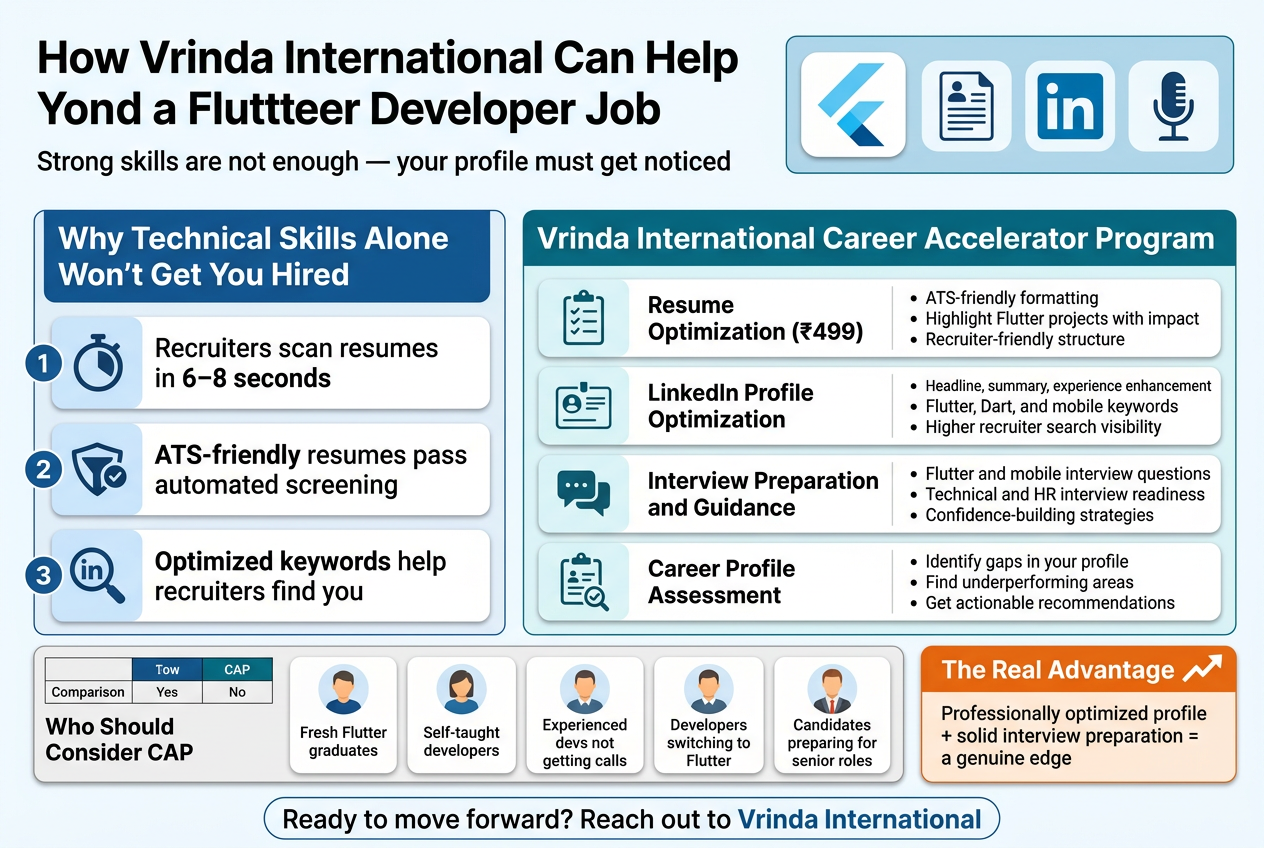
Why Your Technical Skills Alone Won’t Get You Hired
You could be an excellent Flutter developer — solid with widgets, state management, API integration, and clean architecture — and still struggle to get interview calls. This happens more often than most people realize. The problem usually isn’t your skills. It’s how your profile is being presented to recruiters.
Recruiters spend an average of six to eight seconds scanning a resume before deciding whether to move forward. If your resume isn’t ATS-friendly, or if your LinkedIn profile isn’t optimized with the right keywords, your profile simply won’t show up in recruiter searches. You’re essentially invisible to the very people who could hire you.
This is exactly where Vrinda International’s Career Accelerator Program (CAP) steps in.
What the Career Accelerator Program Covers
The CAP is built specifically to bridge the gap between having strong technical skills and actually landing interviews. Here’s a breakdown of what’s included:
Resume Optimization (₹499)
A well-crafted resume does more than list your experience — it tells a compelling story about your value as a Flutter developer. The CAP team works on:
- ATS-friendly formatting so your resume clears automated screening filters that most companies use
- Highlighting Flutter projects in a way that shows real impact, not just a list of technologies
- Presenting your technical skills and achievements in a structured, recruiter-friendly format
- Improving overall visibility so hiring managers want to read more
If you’ve been sending out resumes without hearing back, there’s a good chance the format or content isn’t working for you. A professionally optimized resume changes that.
LinkedIn Profile Optimization
Most Flutter developer job opportunities today come through LinkedIn — either from recruiters reaching out directly or from companies reviewing your profile after you apply. An unoptimized profile is a missed opportunity every single day.
The LinkedIn optimization service focuses on:
- Professional profile enhancement covering your headline, summary, and experience sections
- Keyword optimization for Flutter developer roles, mobile app development, and Dart — the terms recruiters actually search for
- Positioning your profile so it appears higher in recruiter search results
A strong LinkedIn presence works passively for you, even when you’re not actively job hunting.
Interview Preparation and Guidance
Getting shortlisted is only half the battle. Many candidates lose job offers during interviews — not because they lack knowledge, but because they haven’t prepared for how technical interviews are structured.
The interview preparation component covers:
- Common Flutter and mobile development interview questions — both conceptual and practical
- Technical interview readiness including how to explain your projects, walk through code, and tackle problem-solving questions
- HR interview preparation covering behavioral questions, salary negotiation, and how to present yourself confidently
- Confidence-building strategies so you walk into interviews composed and prepared
Career Profile Assessment
Before diving into any optimization, a personalized assessment of your current profile is carried out. This helps identify:
- Specific gaps that might be affecting your job search
- Areas where your profile is underperforming compared to the market
- Clear, actionable recommendations to strengthen your employability
This assessment alone can give you a clear picture of exactly what needs to change.
Who Should Consider CAP
| Profile Type | How CAP Helps |
|---|---|
| Fresh Flutter graduates | Builds a professional first impression with zero experience on your side |
| Self-taught developers | Helps package skills and projects in a way recruiters understand and value |
| Experienced devs not getting calls | Identifies resume and profile gaps slowing down your job search |
| Developers switching to Flutter | Frames your transition positively and highlights transferable skills |
| Candidates preparing for senior roles | Sharpens your profile for senior Flutter and lead developer positions |
The Real Advantage in a Competitive Market
The demand for Flutter developers is growing fast across startups, product companies, and IT service organizations. But so is the competition. Thousands of developers are applying for the same roles, and the ones who get hired aren’t always the most technically advanced — they’re the ones who know how to present themselves well.
Combining strong Flutter skills with a professionally optimized profile and solid interview preparation gives you a genuine edge over candidates who are relying on technical skills alone.
If landing a Flutter developer role is your goal, working on your profile strategy is just as important as building another project. Vrinda International’s CAP is designed to make sure your skills actually get noticed — and that you’re ready to close the deal when the interview comes.
Ready to move forward? Reach out to Vrinda International for a professional profile assessment and find out exactly how the Career Accelerator Program can help you get closer to the Flutter developer role you’re working toward.
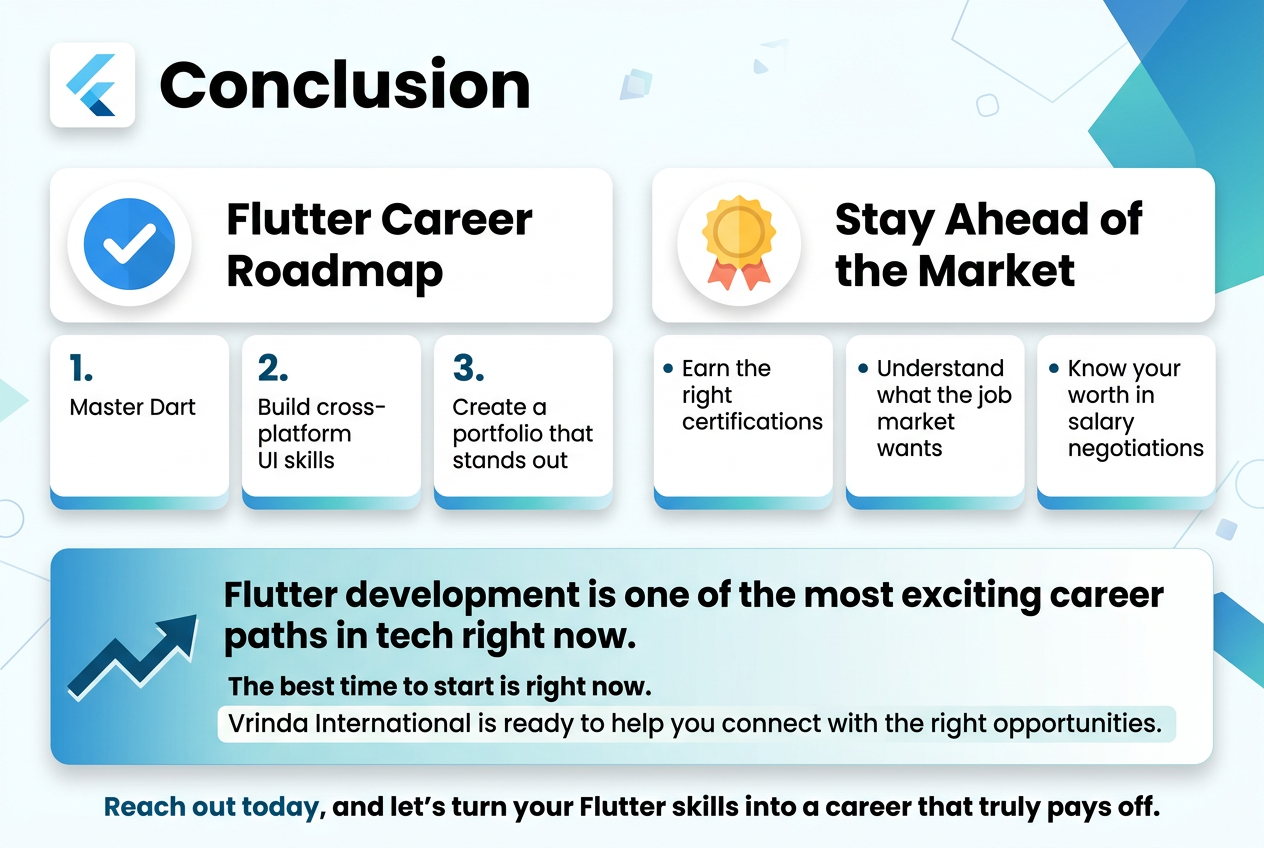
Flutter development is one of the most exciting career paths in tech right now, and the roadmap is clearer than you might think. From mastering Dart and cross-platform UI skills to building a portfolio that actually stands out, every step you take moves you closer to landing a role you genuinely love. Add the right certifications, understand what the job market wants, and know your worth when it comes to salary negotiations — and you are already ahead of most candidates walking through the door.
The best time to start is right now. If you are serious about breaking into Flutter development or leveling up your existing career, Vrinda International is ready to help you connect with the right opportunities. Reach out today, and let’s turn your Flutter skills into a career that truly pays off.